
The Salary Cap method for business owners

Protect your profit first.

Finally know what your business can afford today. Expense Control Hub is the easy way to apply the Salary Cap method: set your profit and owner pay first, move your real expenses until they fit, and never miss a contract action date again.

  • What you can afford today
  • When every contract ends, and when to act
  • Every action delegated, dated and tracked

Works from the P&L, Balance Sheet and Cash Flow you already export to Excel.

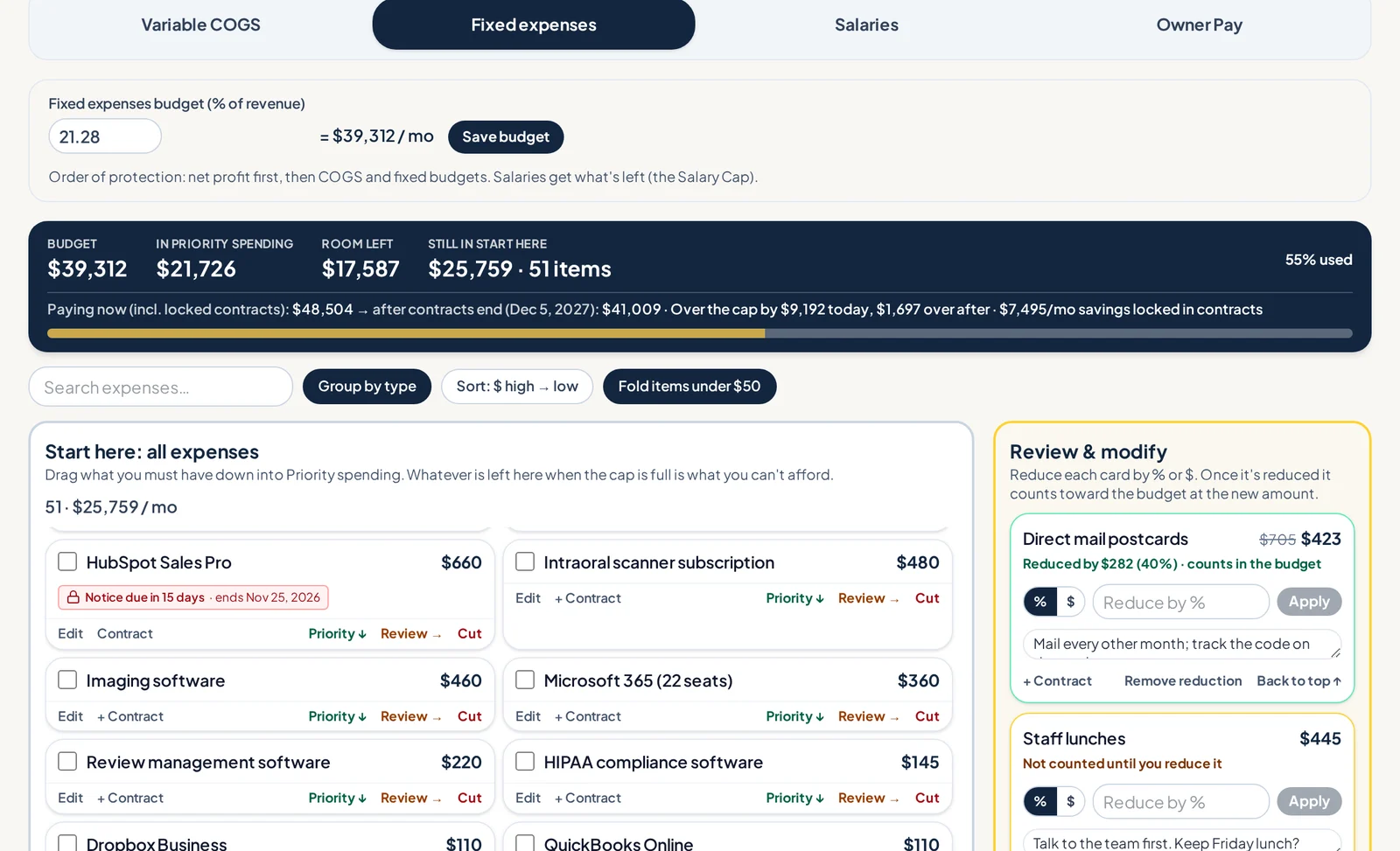
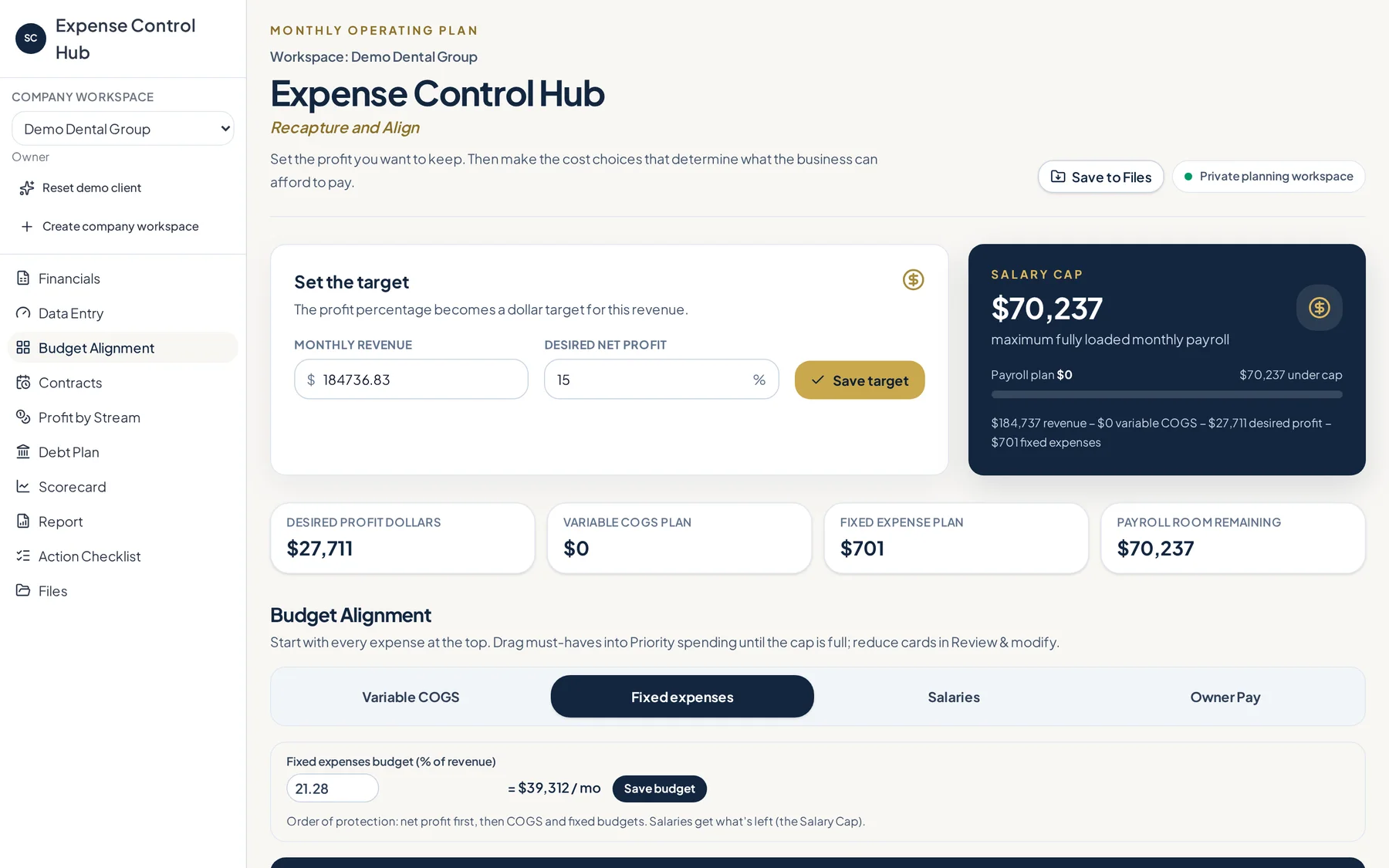
Expense Control Hub budget board with expense cards and the Salary Cap bar
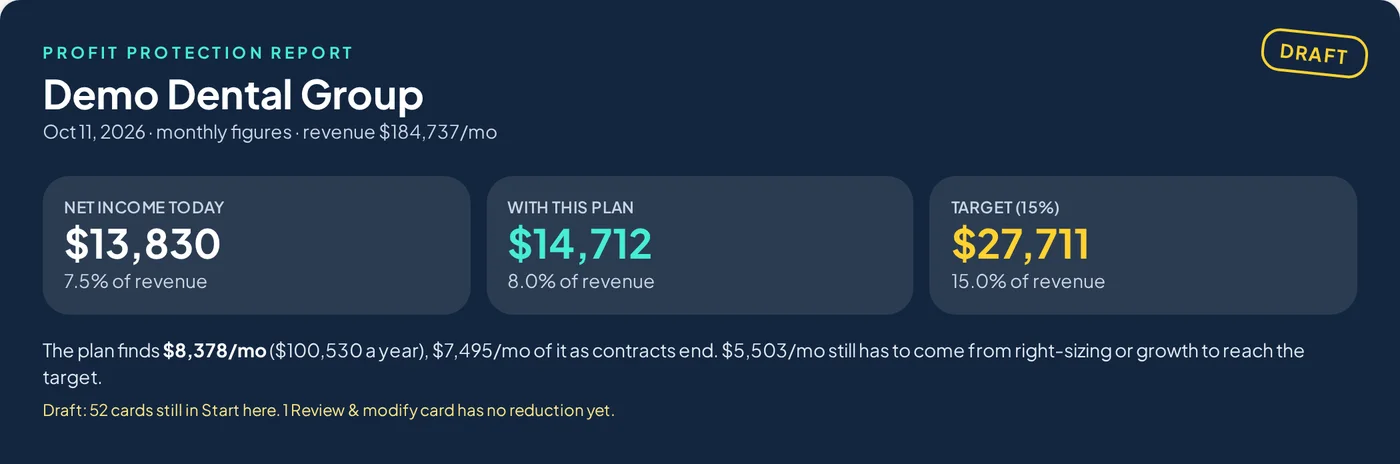
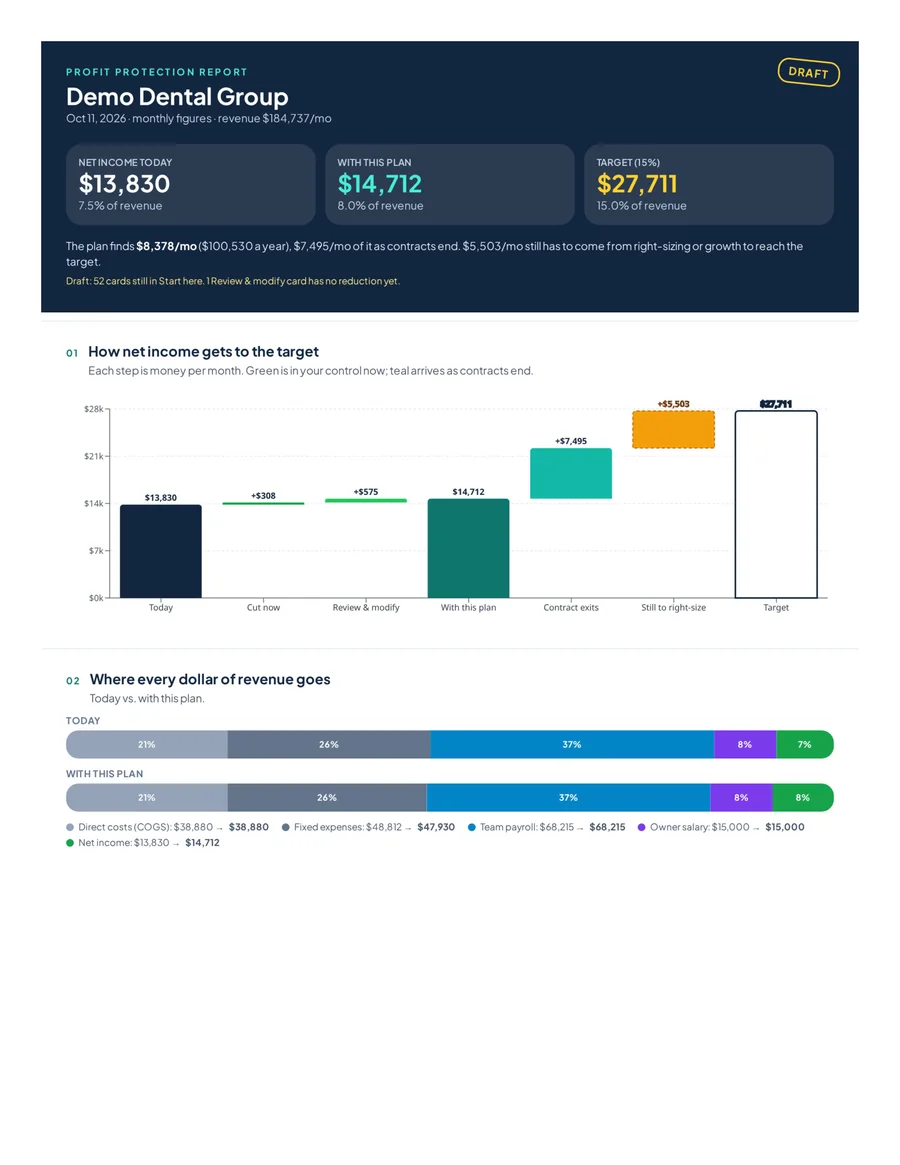
Profit Protection Report headline: net income today, with the plan, and target
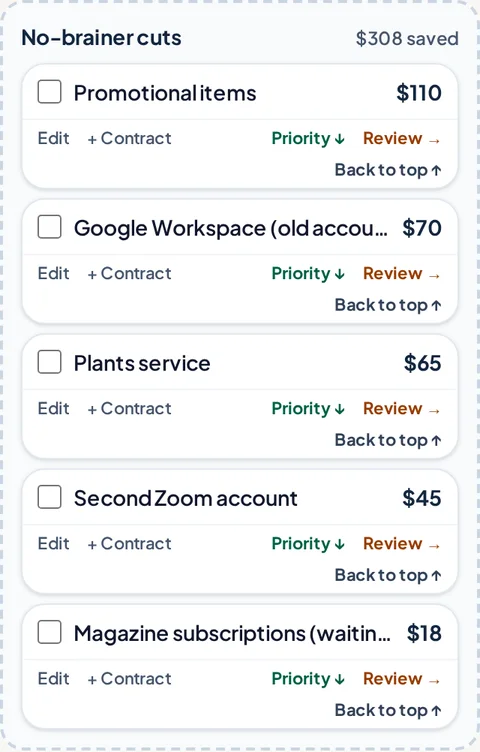
No-brainer cuts column
$8,378/moin actions found
$100,536a year in savings value
26dated, assigned actions
8contracts tracked before they renew
Sample results from our demo practice, "Demo Dental Group." Fictional numbers, shown so you can see what the output looks like.
The problem

Outside of revenue, this is the pain every business shares.

Spending drifts up. Profit and owner pay get whatever is left over. Even with a bookkeeper or CFO looking at the numbers, most owners still can't answer one simple question: what can the business actually afford today?

"Cut 10%" is not a plan

A percentage on a slide doesn't tell you which subscription, contract, or vendor goes.

Contracts renew while you're busy

Notice windows close quietly, and another year of a cost you meant to drop starts on its own.

Recommendations pile up. Few get delegated.

Every quarter brings a list of suggestions for the team. The meeting ends, and nobody clearly owns the cancel, the call, or the follow-up.

The usual advice

  • Benchmarks and percentages
  • A spreadsheet nobody opens again
  • Cuts with no owner or date
  • Profit is what's left at the end

Expense Control Hub

  • Your real expenses, one card each
  • Profit and owner pay protected first
  • Every cut dated and assigned
  • Progress tracked against revenue
The Salary Cap method

Pro teams don't spend first and hope it works out.

They set a cap, then build the roster to fit it. Your business can do the same: decide the profit you need first, and spending has to fit inside what's left.

Start withRevenue
−
Protect firstProfit target
−
BudgetDirect costs (COGS)
−
BudgetFixed costs
=
What's leftYour Salary Cap
The Salary Cap bar showing budget, priority spending, room left and items still in Start here
1

Set the baseline

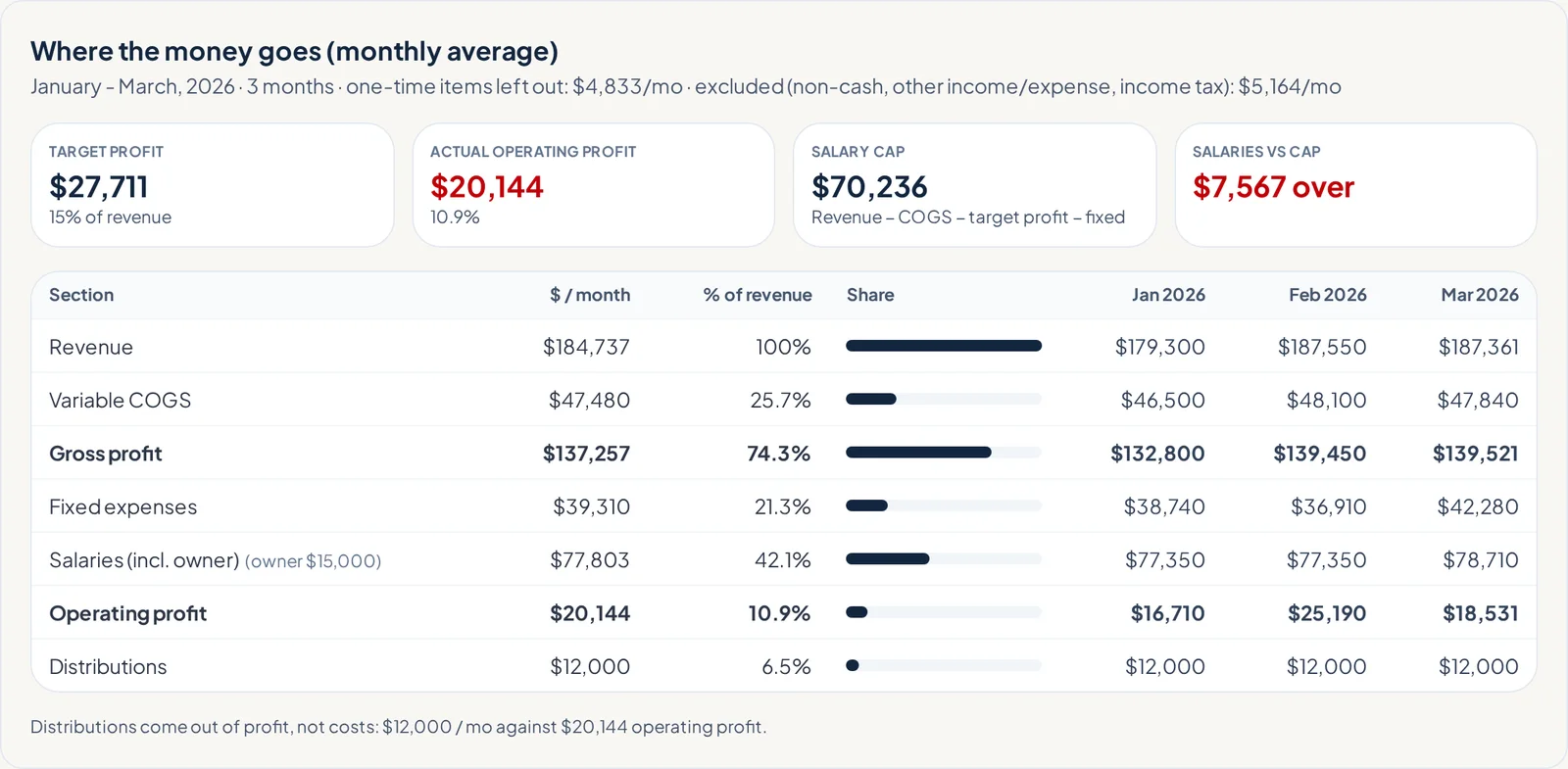
Upload your financial statements. The app finds where every dollar goes, in $ and % of revenue, and checks that it ties to your Net Income.

2

Build the roster

Drag your real expenses into Priority spending until the cap is full. What doesn't fit gets cut, reduced, or scheduled to leave.

3

Track the alignment

Some cuts are instant. Others take months because of contracts or people. The Scorecard tracks spending against revenue coming in and forecast.

How it works

Move real expenses, not percentages.

Every screen below is from the working app, using our fictional demo practice.

STEP 01 · FINANCIALS

Upload your statements. Get the real picture.

Export your Profit & Loss, Balance Sheet and Cash Flow to Excel, either month by month or one total column. Then drop them in.

  • Every major section in $ and % of revenue
  • Must tie to Net Income before anything is saved
  • Asks only the questions it needs, like owner pay and draws
Where the money goes: P&L sections in dollars and percent of revenue
STEP 02 · THE BOARD

Drag your expenses into the cap. Watch it fill.

Every expense becomes a card. Move cards the way you'd move a deal through a pipeline. When a section's cap is met, it changes color.

Start hereAll expenses
PriorityFits the cap
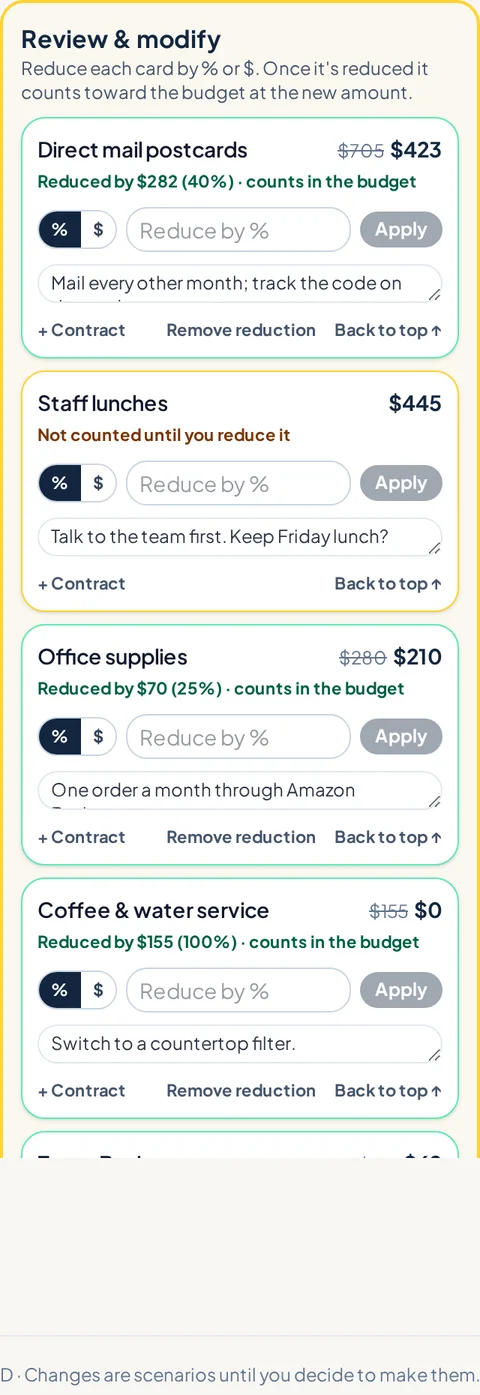
Review & modifyReduce by % or $
No-brainer cutsGone now
Budget board with Start here expenses and Salary Cap target
Review and modify cards with reduce by percent or dollar
STEP 03 · CONTRACTS & LOCK-INS

Know when every contract ends, and when you have to act.

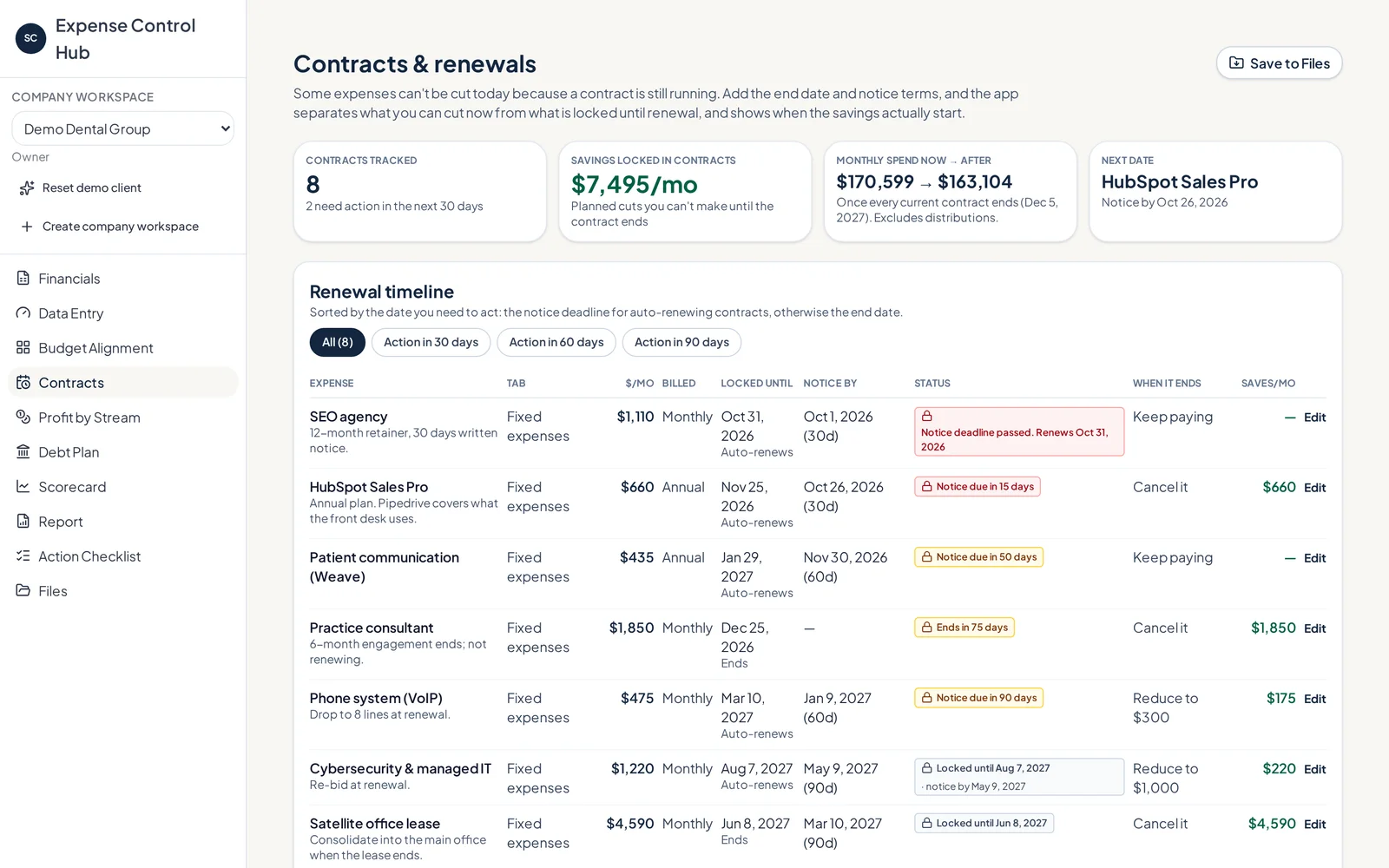
Log the end date, auto-renewal and notice period on any expense. The app works out the date you must act by, flags anything due soon or already missed, and shows when each saving actually starts.

  • A renewal timeline with "act by" dates
  • Savings that arrive later, shown month by month
  • Contracts and documents stored with the expense
Contracts and renewals page with renewal timeline
STEP 04 · ACTION CHECKLIST

No excuses. Every action has a name and a date.

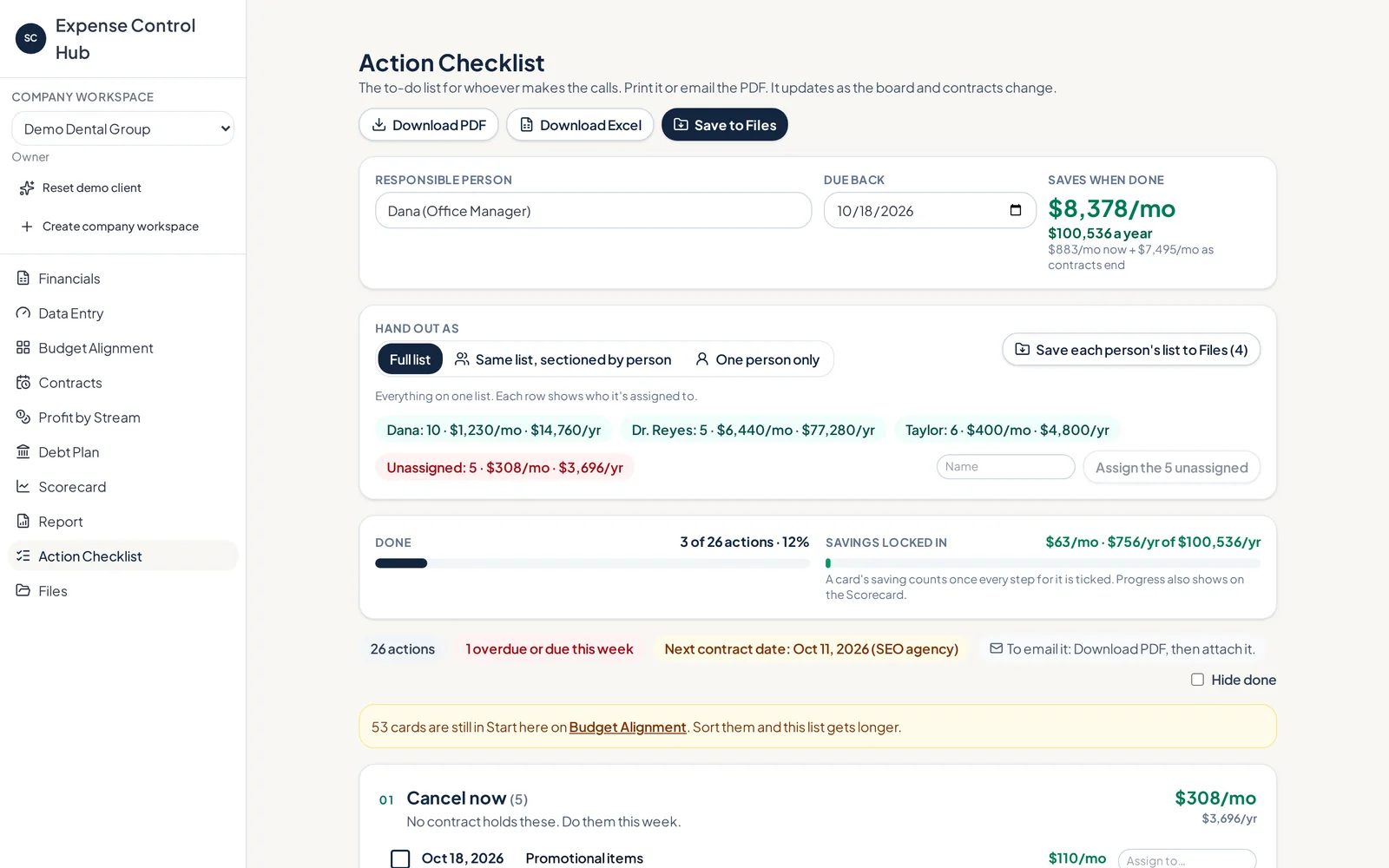
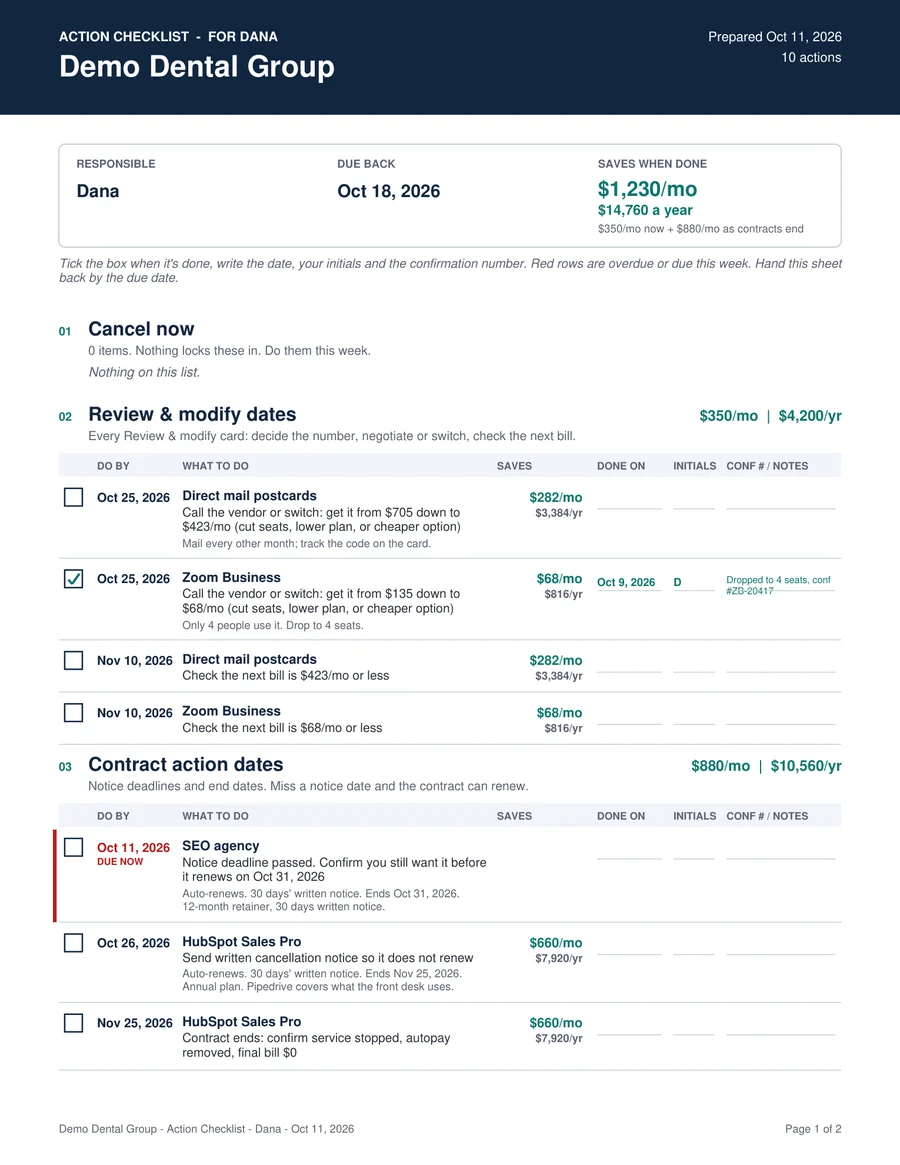
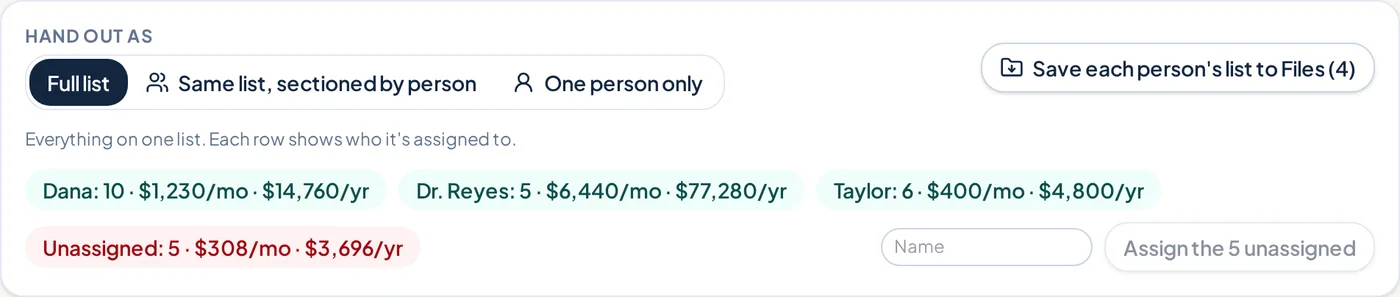
Each cut, reduction and contract date becomes a printable checklist with check boxes, notes and the yearly value of every action. Hand it out as one full list, as a list sectioned by person, or give each person only their own items.

  • Yearly value on every line, so $25/mo shows as $300/yr
  • Private lists for expenses not everyone should see
  • Tick items off and the Scorecard updates
Action checklist with assigned people and savings
Printable checklist PDF for one person
More than a budget

One place to keep spending in line with profit.

It's a complete system for profit and owner-pay goals, not just a cost-cutting tool.

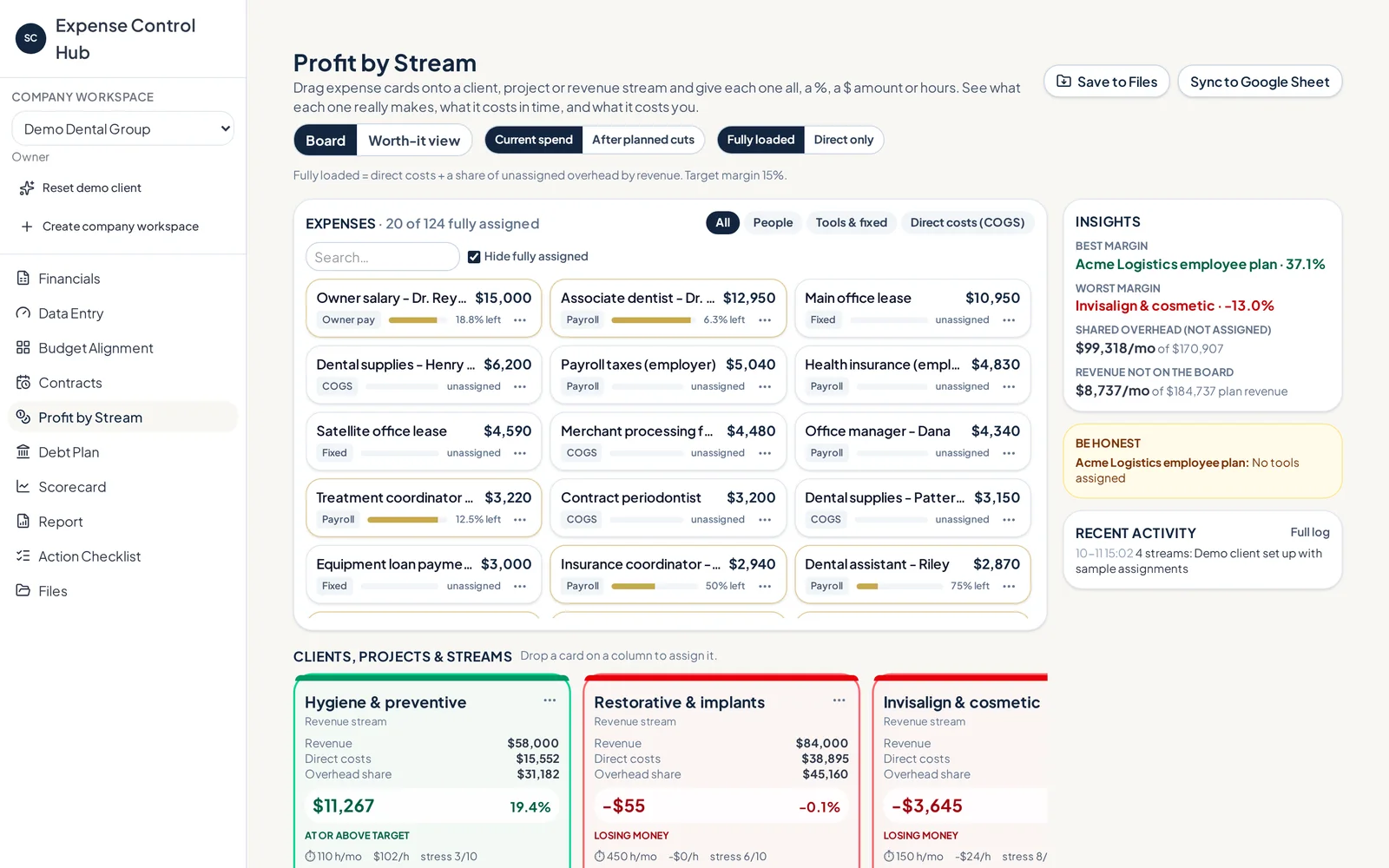
Profit by Stream

Profit by Stream

Drag expenses onto a client, project or revenue stream, then split them by $ or %. See profit, profit per hour, and a stress score from 1 to 10.

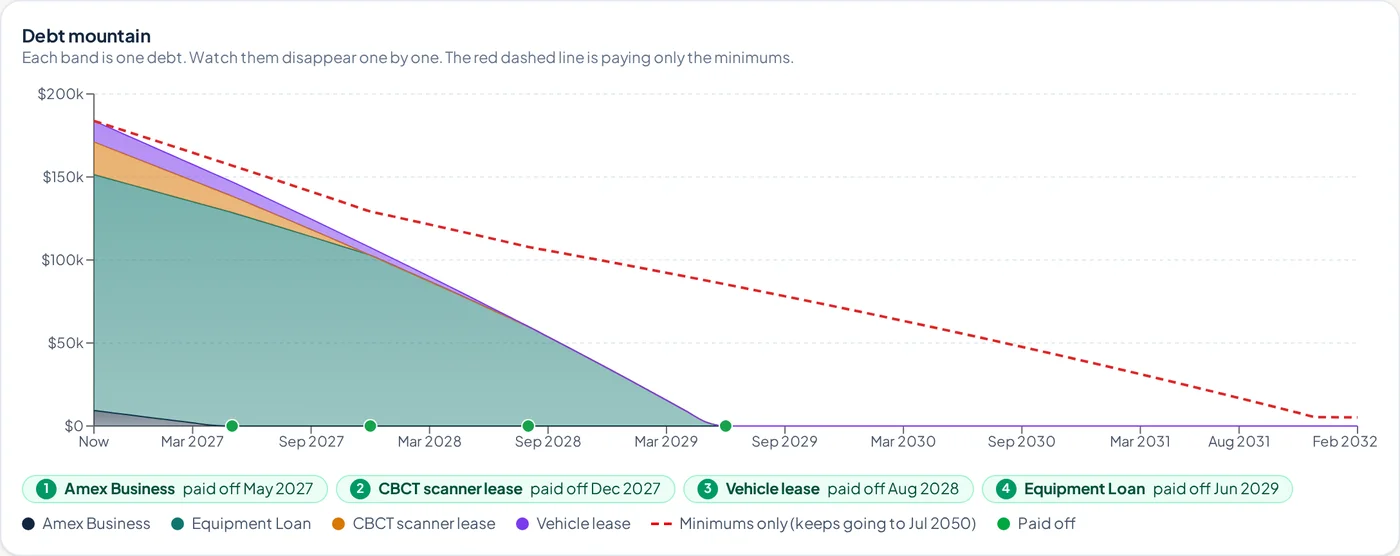
Debt mountain chart

Debt Plan

Cards, loans, leases, lines of credit and more. Compare payoff orders, add extra payments, and see the debt-free date and interest saved.

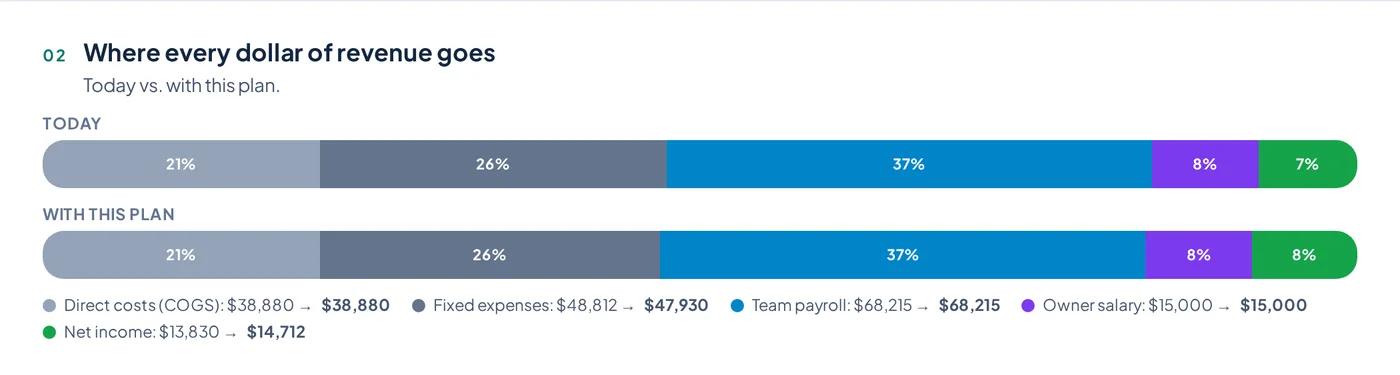
Where every dollar of revenue goes

Where every dollar goes

Today's spending next to the plan: direct costs, fixed costs, payroll, owner pay and net income.

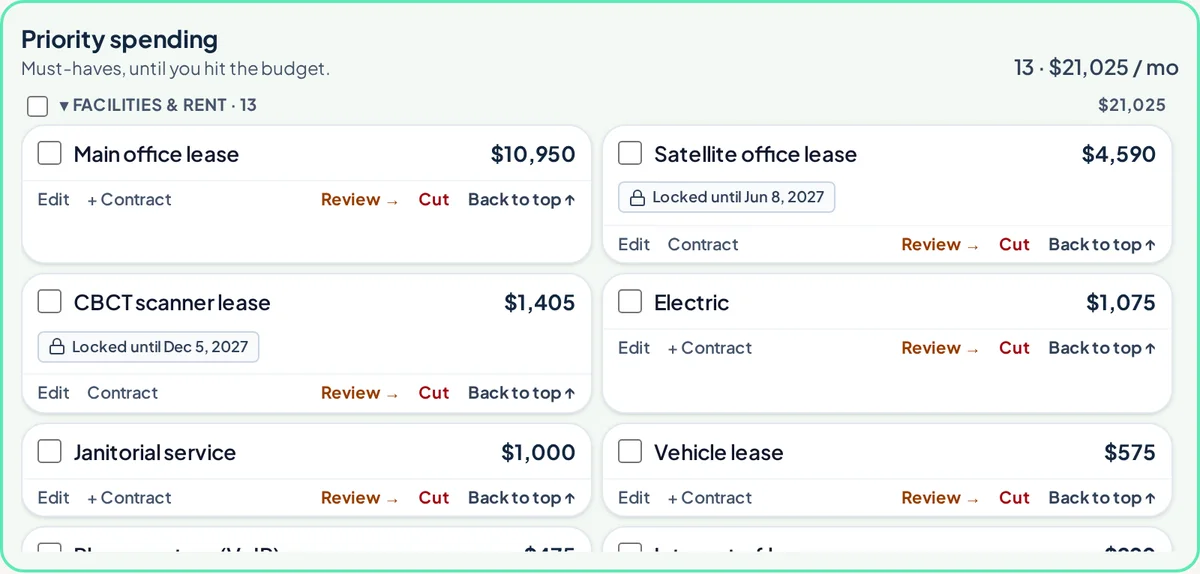
Priority spending section

Priority spending

The roster that stays, with a running count against the cap so you always know how much room is left.

Checklist hand-out options by person

Assign by person

Dana handles software, Taylor handles the office, the owner handles the big calls. Each person gets their list.

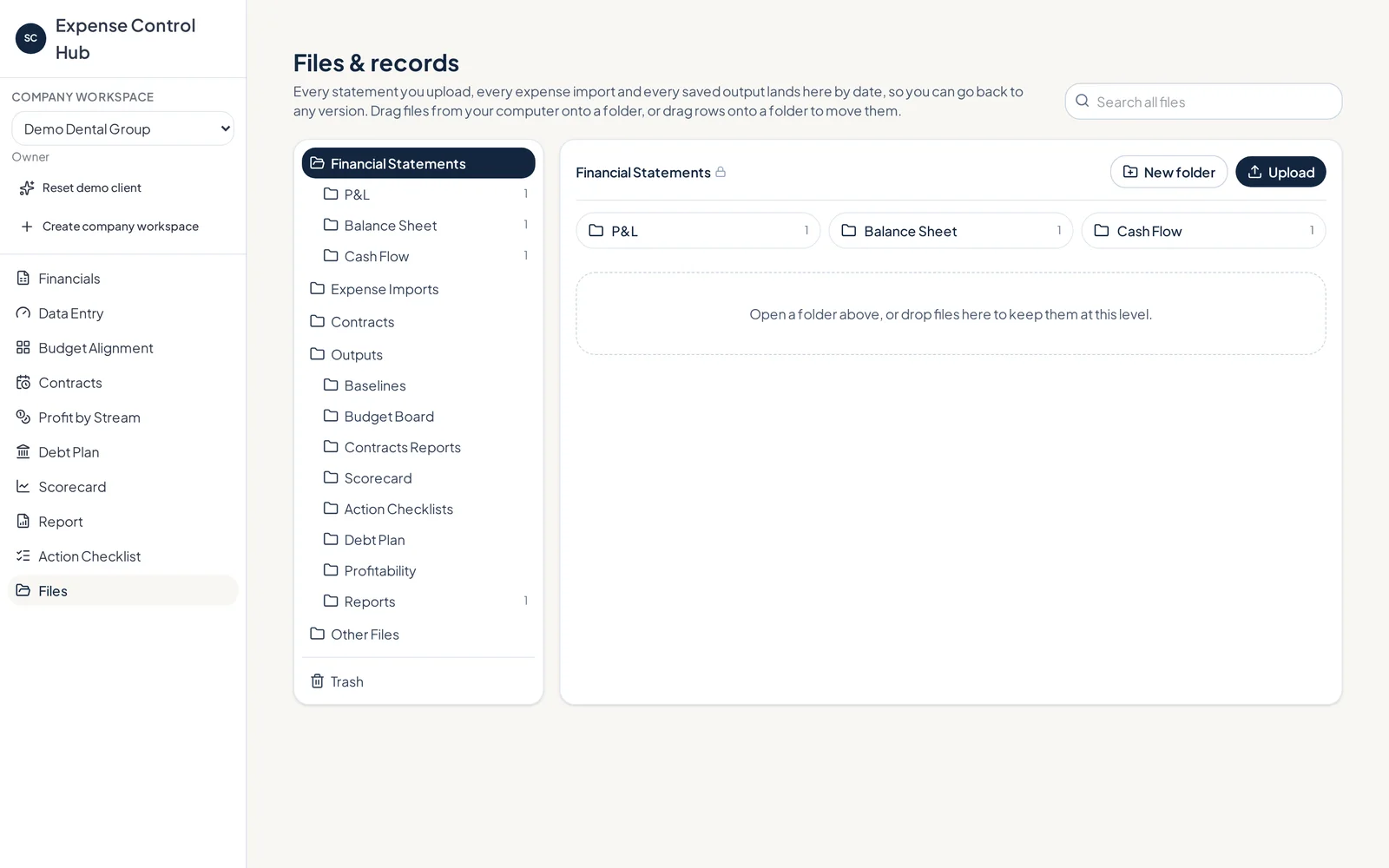
Files and records

Files & records

Statements, contracts, baselines and every report are saved by date in organized folders.

The output

A report you can hand to your team or your banker.

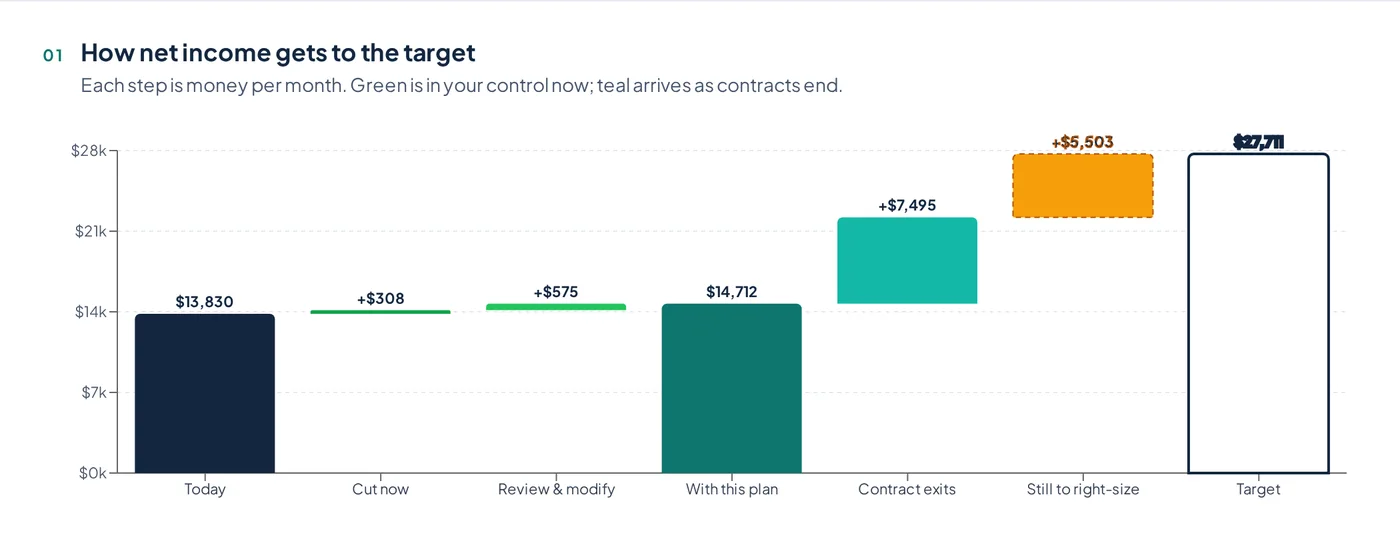
The Profit Protection Report shows, step by step, how Net Income gets from today to your target. It lists what stays, what must go to protect Net Income, and what gets reviewed.

Bridge chart from today's net income to target
Profit Protection Report PDF pageAssigned action checklist PDF page
Corbin Cook, founder of SMB Strategy Consultants
Corbin CookFounder, SMB Strategy Consultants
Why we built it

Built from years of sitting across the table from owners.

I started SMB Strategy Consultants in 2017 after years as a Financial Advisor. Our first work was cash flow forecasting, bookkeeping and fractional CFO support, because owners needed a clear view of what was happening and what decisions had to be made before pressure turned into chaos.

"Even when owners have people looking at the numbers, the exercise of moving their actual expenses around, instead of taking an arbitrary percentage cut, is what changes things."

Expense Control Hub is that exercise, built as an app. It's the same Salary Cap method we use with clients, so any owner can protect real cash flow and Net Profit without waiting for a consultant.

Who it's for

Owners who want profit on purpose, not by accident.

Owner-led service businesses

Agencies, practices, firms and trades where payroll, software and rent creep up faster than revenue.

Tech & SaaS teams

Tool sprawl, annual contracts and seats nobody uses. Find them, assign them, and set exit dates.

Bookkeepers, CFOs & advisors

Walk clients through real decisions in one session and leave them with a report and a checklist.

Questions

Straight answers.

Is this a receipts or expense-report app?

No. Expense Control Hub doesn't scan receipts or reimburse employees. It decides how much your business should spend, and on what, so profit and owner pay are protected first.

What do I need to get started?

Your Profit & Loss, Balance Sheet and Cash Flow statement exported to Excel from your accounting software. Month by month with a total, or one total column, both work. You can also drop in a CSV or Excel list of expenses.

Does it just tell me to cut a percentage?

No, and that's the point. You make the call on each real expense: keep it, reduce it by a set % or $, cut it, or plan its exit when the contract ends. The app does the math and keeps score.

What about expenses I can't cut right away?

Many costs take time because of contracts, people or timing. Those stay on the board, get an action date, and the Scorecard tracks how your spending lines up with revenue, through growth or cost reduction, over time.

Is it part of a bigger platform?

Expense Control Hub works on its own. It will also be part of the CFO Clarity Layer inside LeveragePanel for businesses that want the full financial picture.

How do I see it?

Book a live demo. We'll walk through the demo practice, then talk about how it would work with your numbers.

Set the cap. Build the roster. Protect your profit first.

See the Salary Cap method on a real board in a 30-minute live demo.

Book a live demo →